Certains lecteurs Roku sont livrés avec une télécommande Roku standard qui utilise une lumière infrarouge (IR) invisible pour transmettre à courte distance les commandes données en appuyant sur les boutons. Pour que votre télécommande standard fonctionne correctement, il ne doit y avoir aucun obstacle qui pourrait bloquer le signal entre la télécommande et la face avant du lecteur (où le voyant d'état apparaît lorsque le lecteur est allumé).
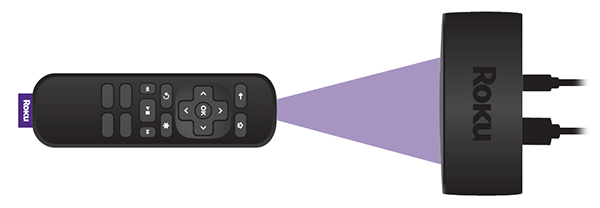
Si votre lecteur ne détecte pas les commandes envoyées lorsque vous appuyez sur les boutons de la télécommande standard, le problème est probablement dû à l'emplacement du lecteur ou à des piles faibles. Si vous avez besoin de plus d'aide pour déterminer le type de télécommande que vous utilisez avec votre appareil Roku, consultez le guide pour déterminer le type général de votre télécommande Roku.
Les conseils dans cet article s'adressent aux propriétaires de Roku Express, de Roku Express 4K, et de Roku Premiere. Si vous avez besoin d'aide avec la télécommande standard incluse avec tout autre appareil Roku, consultez les étapes de dépannage générales pour les télécommandes standard.
Que dois-je faire si mon lecteur ne détecte pas les commandes envoyées en appuyant sur les boutons de la télécommande?
Vous pouvez essayer deux choses :
- Re-locate your Roku player: The most common reason button presses are missed is due to a Roku player located in a position where the signal from the remote is blocked (or partially blocked) from getting to the player. Make sure that you can see the flat front face of your Roku player from where you are sitting and there is no visible obstruction between the player and the remote. The front face is where you see the status light when your player is powered on.
Try holding your remote higher (e.g., above your head) and point it downwards at the front of your Roku player. Move the remote to the left and right, making sure it is always pointing directly at the front of your player. If your player becomes more responsive when testing from various positions, check that no obstructions are blocking the front of your player or the signal from your remote. Move any obstacles that may block the signal, or if possible, move your player to a position where it responds reliably to button presses.
If your Roku player is attached to your TV with the included adhesive strip, try locating it in a different position where the signal is less likely to be blocked. If the player is located along the bottom of the TV, something as simple as a cabinet in front of the TV may block the signal.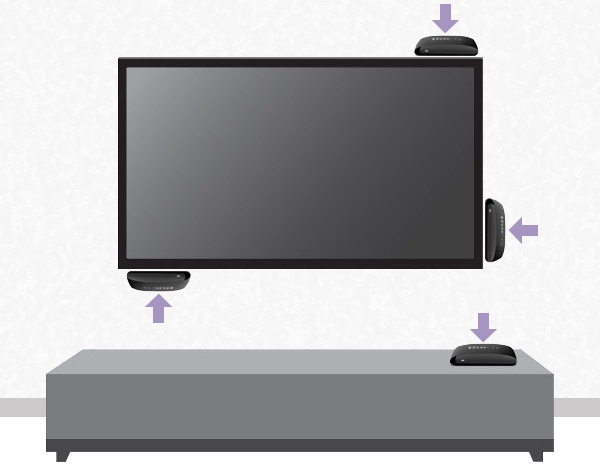
Make sure the Roku player is not located behind the TV or inside a cabinet.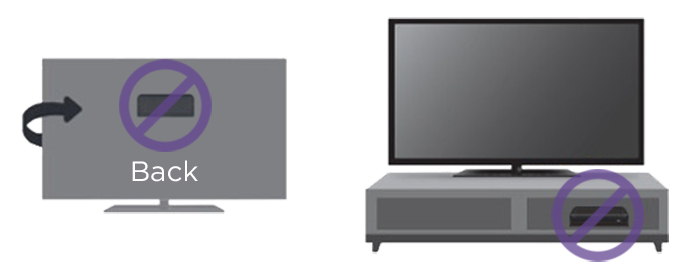
If you need help finding a good location, review the steps for attaching your Roku player to a flat surface. - Change the batteries: If moving your Roku player does not help, then try changing the batteries in the remote. Always make sure to use fresh, matching batteries and that they are positioned correctly.
Last updated at 2/19/2026 7:58:53 PM
Cet article a-t-il été utile ?
Articles similaires
Vous avez encore besoin d’aide ?

Assistance par un agent
Nous proposons une assistance par un agent pour certains problèmes et certains appareils.
Vérifier les options d’assistance