Alguns dispositivos de streaming Roku® incluem um controle remoto infravermelho padrão. Isso significa que o controle remoto precisa ser apontado diretamente para o dispositivo de streaming Roku ao pressionar os botões e não pode haver obstruções que possam bloquear o sinal que sai do controle remoto e impedir que ele chegue à parte frontal do dispositivo de streaming (onde a luz LED aparece quando ele está ligado).
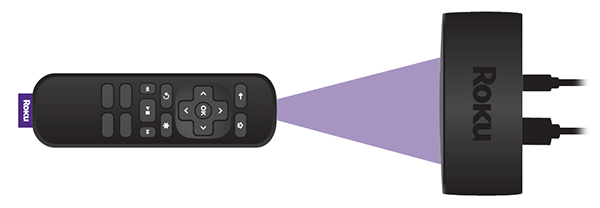
Se o dispositivo de streaming Roku não detecta quando você pressiona os botões do controle remoto, geralmente o motivo é a localização do dispositivo de streaming ou pilhas fracas.
O que devo fazer para resolver problemas relacionados à não detecção de botões pressionados?
Há duas coisas que você pode tentar:
- Re-locate your Roku player: The most common reason button presses are missed is due to a Roku player located in a position where the signal from the remote is blocked (or partially blocked) from getting to the player. Make sure that you can see the flat front face of your Roku player from where you are sitting and there is no visible obstruction between the player and the remote. The front face is where you see the status light when your player is powered on.
Try holding your remote higher (e.g., above your head) and point it downwards at the front of your Roku player. Move the remote to the left and right, making sure it is always pointing directly at the front of your player. If your player becomes more responsive when testing from various positions, check that no obstructions are blocking the front of your player or the signal from your remote. Move any obstacles that may block the signal, or if possible, move your player to a position where it responds reliably to button presses.
If your Roku player is attached to your TV with the included adhesive strip, try locating it in a different position where the signal is less likely to be blocked. If the player is located along the bottom of the TV, something as simple as a cabinet in front of the TV may block the signal.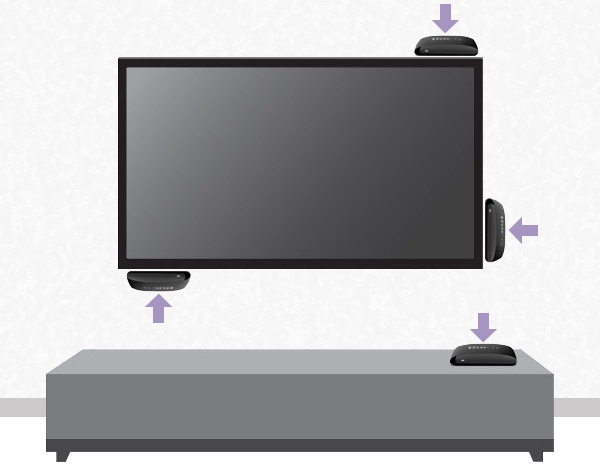
Make sure the Roku player is not located behind the TV or inside a cabinet.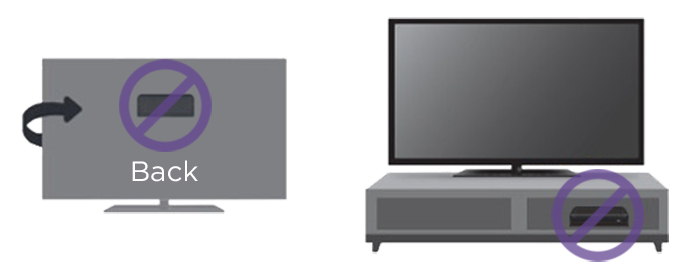
If you need help finding a good location, review the steps for attaching your Roku player to a flat surface. - Change the batteries: If moving your Roku player does not help, then try changing the batteries in the remote. Always make sure to use fresh, matching batteries and that they are positioned correctly.
Last updated at 2/19/2026 7:58:55 PM
Este artigo foi útil?
Artigos relacionados
Precisa de mais ajuda?

Suporte de agentes
Oferecemos suporte de agentes para determinados problemas e dispositivos.
Conferir as opções de suporte