Para administrar o cancelar tu suscripción a Howdy, el servicio de streaming de Roku, sigue estos pasos.
Administra o cancela tu suscripción a Howdy en el sitio web de Roku
Go to my.roku.com/subscriptions.
Under Active subscriptions, select the Howdy subscription.
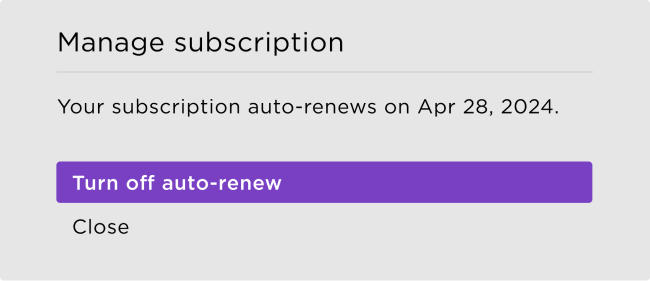
Select Manage subscription and then select Turn off auto-renew to cancel.
When you cancel your subscription, you'll still have access until your current billing cycle ends.
Administra o cancela tu suscripción a Howdy en tu dispositivo Roku
Press the Home
 button on your Roku remote.
- Use your remote's arrow buttons to highlight the Howdy app.
Press the Star
 button on your remote.
- Select Manage subscription to view the renewal date and access more options.
To cancel a subscription, select Turn off auto-renew. Your subscription will be active until the end of the billing cycle.
If you've set a Roku PIN for subscriptions and purchases, enter it when prompted to confirm.
Last updated at 9/9/2026 10:01:38 PM
¿Fue útil este artículo?
Artículos relacionados
¿Necesitas más ayuda?

Soporte técnico con agentes
Ofrecemos soporte técnico con agentes para ciertos problemas y dispositivos.
Consulta las opciones de soporte técnico