Para administrar o cancelar tu suscripción a Howdy, el servicio de streaming de Roku, sigue estos pasos.
Administra o cancela tu suscripción a Howdy en el sitio web de Roku
Go to my.roku.com/subscriptions.
Under Active subscriptions, select the Howdy subscription.
Select Manage subscription and then select Turn off auto-renew to cancel.
When you cancel your subscription, you'll still have access until your current billing cycle ends.
Administra o cancela tu suscripción a Howdy en tu dispositivo Roku
Press the Home
 button on your Roku remote.
- Use your remote's arrow buttons to highlight the Howdy app.
Press the Star
 button on your remote.
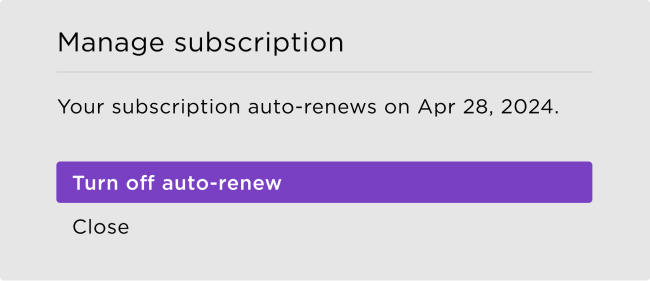
- Select Manage subscription to view the renewal date and access more options.
To cancel a subscription, select Turn off auto-renew. Your subscription will be active until the end of the billing cycle.
If you've set a Roku PIN for subscriptions and purchases, enter it when prompted to confirm.
Last updated at 9/9/2026 10:01:38 PM
¿Fue útil este artículo?
Artículos relacionados
Administrar o cancelar suscripciones
Administrar o cancelar una suscripción a través de Roku
Qué hacer si pierdes el dispositivo de streaming Roku® o te lo roban
Si perdiste tu dispositivo de streaming Roku ® o sospechas que te lo han robado, recomendamos que te comuniques con el organismo local
Configurar una lista de canales de TV favoritos
Con una gran variedad de canales de streaming en vivo en la Guía de canales de TV en vivo, tal vez desees ocultar determinados ™ y una
¿Necesitas más ayuda?

Soporte técnico con agentes
Ofrecemos soporte técnico con agentes para ciertos problemas y dispositivos.
Consulta las opciones de soporte técnico