Your Roku® voice remote connects to your Roku streaming player or Roku TV™ system through a wireless process called pairing. Once paired, you can use all features, including Roku voice search. If you are setting up a Roku Touch® tabletop remote, see Connecting and using your Roku Touch.
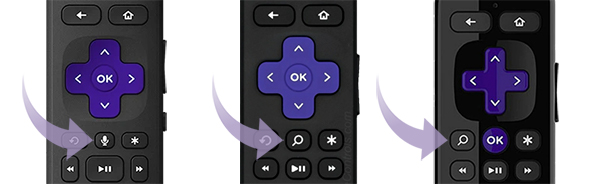
How to identify your Roku remote
- Voice Remote: Has a voice button near the purple directional pad, with a microphone or magnifying glass icon.
- Simple Remote: No voice button.

Note: If unsure, check Tips for identifying your Roku remote.
How to pair your Roku remote during TV or player setup
If your device came with a Roku voice remote, follow the on-screen instructions during initial setup to pair it. If you need help, see the steps below for putting your remote in pairing mode.
Put your Roku device into pairing mode
Option 1: From Settings (requires another working Roku remote or mobile app)
- Press Home on the working remote or in the Roku mobile app
- Go to Settings > Remotes & devices > Add devices > Remote > Continue
- Follow on-screen instructions
Option 2: Restart your Roku player or TV (no second remote required)
- Unplug the power cord
- Wait at least 5 seconds
- Plug it back in
- When the Home screen appears, follow the steps to put your voice remote into pairing mode
Note: If you don’t have a remote, you can control your device with the Roku mobile app.
Putting your voice remote into pairing mode
How to sync your Roku remote with a pairing button:
- Found on the back or under the battery cover
- Press and hold for 5 seconds until the status light flashes
How to sync your Roku remote without a pairing button:
- Press and hold Back + Home buttons for 5 seconds until the status light flashes
If pairing fails, make sure both the streaming device and remote are in pairing mode simultaneously. For additional help, see How to fix your Roku remote.
Using your Roku Voice Remote
Voice Controls:
- Push-to-talk: Press the voice button, say a command, and release. Example: “Search for comedies” or “Launch The Roku Channel.”
- Hands-free (Roku Voice Remote Pro): Turn on the slider to green, then say commands aloud. Example: “Hey Roku, show me the news.”
TV Controls:
- Certain remotes can control power, volume, and mute on your TV. Learn how to set up.
Shortcuts:
- Assign personal shortcuts with the 1 or 2 buttons.
- Quick Launch button can open apps or toggle captions.
Other Features:
- Live TV button – access free live TV. Learn how.
- Lost Remote Finder – makes a sound via the remote or mobile app.
- Headphone Mode – plug in headphones to mute TV speakers. Try it.
- Backlit buttons – see what you’re pressing in the dark.
Note: The voice remote does not need to be pointed directly at your Roku device.
Troubleshooting
- Remote not pairing? Make sure both the device and remote are in pairing mode at the same time.
- Try restarting your streaming device and repeating the steps.
- If still not working, check for interference from other electronics, obstacles, or the distance from the device.
- As a last resort, use the Roku mobile app to control your device.
Last updated at 3/3/2026 1:39:10 AM
Was this article helpful?
Related articles
Need more help?
