If you receive one of the following errors: "Not enough memory,""Can't run app" or "Insufficient memory" when opening an app on your Roku® streaming device, you may be experiencing an internet connection issue or low storage space on your Roku device.
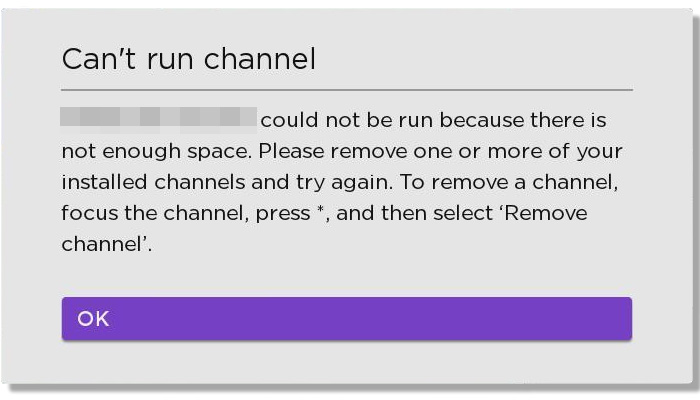
Read more about fixing the "Can't run app" and "Insufficient memory" error message on your Roku streaming device in the steps below.
Fix 'Not enough memory' error on your Roku device
System restart your device
A system restart is the least invasive reset method and won't affect your settings. If you have a Roku TV, it is not the same as pressing the power button on the remote or the physical power button on the TV itself.
- Remove the power cord from your Roku device for at least 10 seconds before plugging it back in
If reaching the power cord is inconvenient, you can also use the instructions below to perform a system restart from the Settings menu (assuming you can control your Roku device with the remote or the free Roku mobile app for iOS® or Android™).
- Press Home
 button on Roku remote on your Roku remote
 - Scroll and select Settings
- Select System
- Select Power
- If you do not see a Power submenu, skip to the next step.
- Select System restart
In either case, your Roku device will complete a system restart and should return to normal operation after a moment. If it does not, continue to the next section.
How to fix low storage space
Low memory messages may also occur because your Roku device lacks the required storage space to store and install apps. Removing other apps from your Roku device can free up space.
- Press Home on your Roku remote
- Move to the right and highlight the app you wish to remove
- Press Star
 on your Roku remote to open the Options menu
 - Select Remove app and confirm when prompted

Tip: If your Roku streaming device has a micro SD card slot, you can expand the memory available for installing apps.
How to fix network issues
These error messages may be caused by a network issue preventing your Roku streaming device from properly opening an app. This can be due to a weak signal or issue with your internet provider.
- If you are connected to the Wi-Fi, refer to the article on how to improve the wireless connection for more information
- If you are using a wired connection, follow the steps listed in the article on how to connect your Roku streaming device using Ethernet
Last updated at 9/6/2026 3:05:40 AM
Was this article helpful?
Related articles
Need more help?
