Your Roku® streaming player or Roku TV™ provides you with access to stream audio and video from the internet. For this to work, you need a good connection from your Roku device to your home network, and from your home network to the internet.
This article provides steps to help check that these connections are working properly, along with suggestions for troubleshooting any problems.
Why do I see an error message such as “Unable to connect to wireless network” or “Not connected to the internet”?
When you set up your Roku player or Roku TV for streaming, you must connect this device to your home network in the same way that you connect your computer or mobile device. Simply select your wireless network name and enter the correct password. In doing so, a wireless connection is established from your Roku device to your home access point or router*. Your router will then grant access to the internet through a broadband service provided by your internet service provider, or ISP (usually your cable or phone company).
Note: On Roku streaming devices that have an Ethernet port, you can alternatively choose to connect to your router using an Ethernet, or wired network cable.
If your Roku device is unable to connect to your home router or gain access to the internet through the router, you may not be able to set up your device. In cases where the network or internet connection is lost after your device is set up; you may not be able to launch channels that require an internet connection or you may experience interruptions when streaming.
Below are some example error screens you may see should your Roku device encounter a connectivity issue.
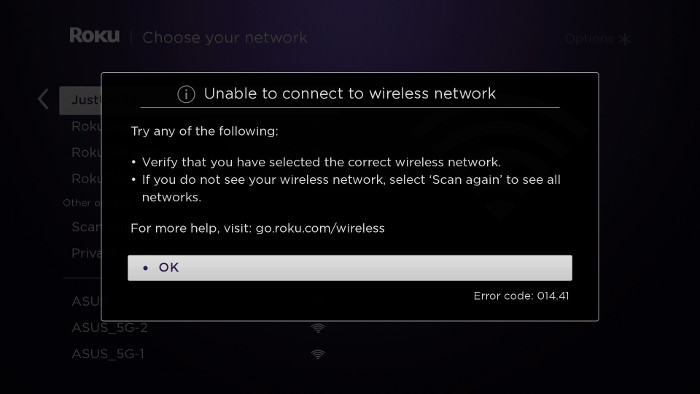
- This screen may appear when you are initially trying to connect your Roku streaming device to your wireless network.
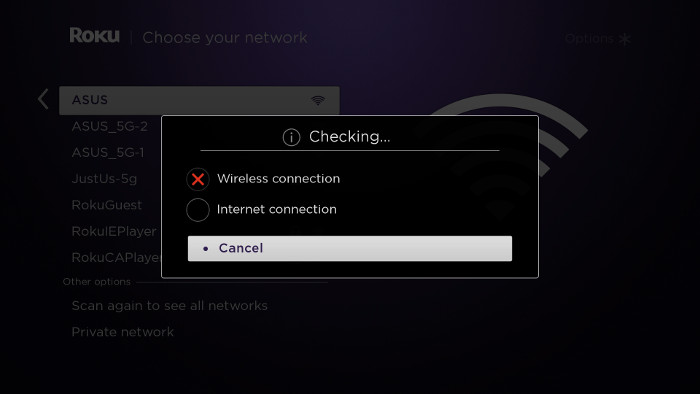
- The screen below may appear when your Roku device is trying to make the connection after your wireless network name and password have been entered.
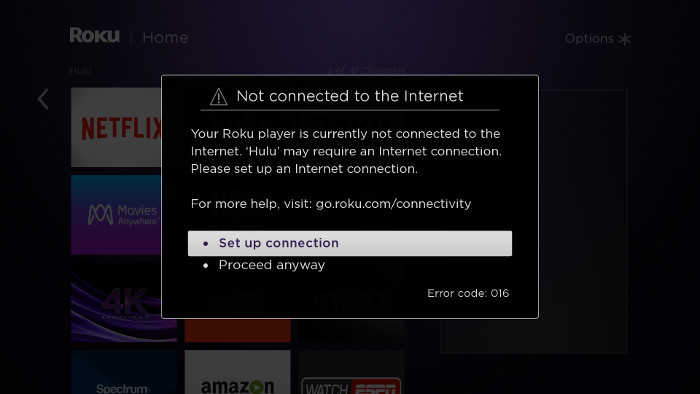
- The next screen may appear if the network or internet connection is lost when trying to launch a streaming channel.
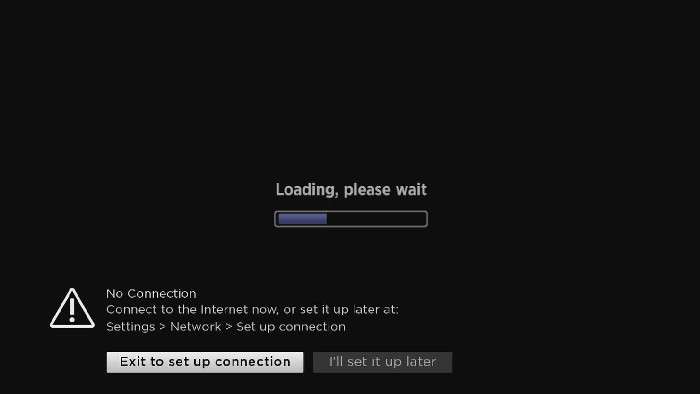
- If the network or internet connection is lost during playback, you may see the following error screen.
How can I check my connection?
If you want to check your connection, visit the Settings menu on your Roku device.
- Go to Settings > Network > Check connection to perform a two-part test. The first part checks for a connection to your home network and tests the quality of the signal. The second part, checks that you are connected to the internet and measures the speed of that connection.
- If the wireless signal strength or internet speed is poor, you will be provided with on-screen instructions to help resolve the issue. To understand the test results better, review the detailed article about the connection check.
Note: If your Roku device is not connected to your network, you will not see the Check connection option. You will only see a Set up connection option. You need to set up your Roku device on your network before you can check the connection.
How can I resolve these connectivity issues?
- Enter the correct name for your wireless network. Selecting the wrong wireless network name will cause your wireless network connection to fail. If you are not certain that your Roku device is connected to the correct network, get help finding your wireless network name.
- Enter the password correctly. If you believe you know your wireless password, but it is not working, try re-entering it. It is easy to make a mistake entering your password, and remember that network passwords are case sensitive. Use the shift button
 on the on-screen keyboard to enter a capital letter. If you do not know the correct password, review the tips for locating your wireless network password.
 - Check to see that your router is working properly. Using your computer or mobile device, connect to your home network and try accessing the internet by launching a public website like www.roku.com. If you can connect to the internet from another device, your router is successfully providing internet access and you can move to the next step. If you are unable to connect to the internet, try restarting your router (see step 5b below) before contacting your ISP.
- Improve the wireless signal strength. If your password is correct and other devices can access the router, but your Roku device is still failing to connect to your wireless network, the most likely problem is the strength of the wireless signal. The wireless signal gets weaker the farther your Roku device is from your router, and with more obstacles (like walls and cabinets) between your router and your Roku device. Review these tips to help improve your wireless signal.
- Restart your Roku device and your router.
- To restart your Roku player, go to Settings > System > System restart. To restart your Roku TV, go to Settings > System > Power > System restart. You can also unplug the Roku device from the power source, wait a few moments, and then reconnect it.
- To restart your router, check the instructions from your ISP or router vendor. In some cases, you can simply unplug it and plug it back in, and in other cases it may require pressing a reset button on the device.
Note: It will take a few minutes for both devices to completely restart.
If you have previously connected your Roku device to your router, it should automatically reconnect. If it is not reconnecting, or if you are setting up your Roku device for the first time, complete the network setup process.
Common Roku error codes and recommended actions
Error code 009
- Try step 3 above: This code means your Roku device is connected to the router, but not able to connect to the internet. If no connection exists, contact your ISP for help. If your computer has an internet connection and you still see Error 009, restart the Roku device (see step 5b above).
Error code 012
- This is specifically an Ethernet-related error. Verify that your Ethernet cable is securely connected to your Roku device and router. Test with a second Ethernet cable if possible. If the cable is good, try step 5 above to restart your Roku device and router.
Error code 013
- This is specifically an Ethernet-related error. Try step 3 above: Check to see that your router is working properly. If you can connect to the internet from another device, restart your Roku device (see step 5a above). If you are unable to connect to the internet from another device, try disconnecting and then re-connecting the Ethernet cable. If the problem continues, reset your router (see step 5b above) before contacting your ISP.
Error code 14
- Start with step 1 above: This is a failure to connect to the wireless network.
Error code 14.10 or 14.11
- Try step 5 above: Restart the router and Roku device.
Error code 14.20
- Try step 4 above: Check that the signal strength is adequate. Your Roku device may be too far from the router.
- Try step 5 above: Restart the router and Roku device.
Error code 14.30
- Try step 5 above: Restart both the router and the Roku device.
Error code 14.40 or 14.41
- Try steps 1 and 2 above: These are caused by an incorrect password for your network. Check that you have selected the correct network and have entered your password correctly. If the issue continues, try step 5 above.
Error code 14.50
- Try step 5 above: Restart both the router and the Roku device.
Error code 14.62 or 14.64
- Try step 4 above: Check that the signal strength is adequate. Your Roku device may be too far from the router.
- Try step 5 above. Restart the router and Roku device.
Error code 016
- This occurs when you are trying to launch a channel but the network or internet connection has been lost. Select Set up connection to go to the network settings on your Roku device and follow the on-screen instructions. If the behavior continues, the wireless signal may be too weak. Try step 4 above. Check that the signal strength is adequate. Your Roku device may be too far from the router.
Error code 017
- This code occurs when your Roku device detects poor wireless signal strength. Follow the on-screen instructions and try moving your Roku device and the router closer to each other. Try steps 4 and 5 above.
Error code 018
- This code occurs when your Roku device detects slow internet speeds. Check with your ISP to determine what speed connection you subscribe to. You may want to consider upgrading to a faster connection.
Wireless vs. Ethernet
All Roku streaming devices have the ability to connect to your router via wireless. Some Roku streaming devices also have an Ethernet port, which uses a cable to connect.
- If it is convenient to connect the cable from your router to the Roku device, Ethernet will provide a faster and more reliable connection. Simply connect a standard Ethernet cable from an available port on your router to the port on the rear of your Roku device.
- A wireless connection can also give you excellent results, provided you are located close enough to your router to receive a clear signal.
*A note on terminology:
To access your network and ultimately the internet, you will typically connect to a device called a router; but it may also be referred to as a wireless router, wireless access point, home gateway or cable modem. In some cases, your internet service provider (ISP) may have provided you with a single integrated device that includes a cable modem and a router, or you may have purchased a stand-alone router from a company such as Linksys, NETGEAR, ASUS, Belkin or D-Link. In this article, the term router is used as a generic term to refer to the network device that your Roku device must connect to access the internet. For more information refer to the documentation provided by your ISP or router manufacturer.
Last updated at 2/13/2026 4:53:22 AM
Was this article helpful?
Related articles
Need more help?
