Every Roku streaming device has a unique serial number and device ID that you may need when contacting Roku for customer support or product service. You can find the serial number or device ID on the physical device itself, from the Settings menu, or on the original packaging. For some products, you can also find this information using the free Roku mobile app for iOS® and Android™.
On the physical device
Roku TV™
Placement of the serial number or device ID varies by manufacturer, but you can often find this information on the back of your Roku TV. If you cannot easily locate the serial number or device ID, get more help on the support website for the manufacturer of your TV.
From the Settings menu
Roku TV
If you have a Roku TV and your device is in use, you can open the Settings menu using the steps below to find the serial number and device ID.
- Press Home
 on your Roku remote
 - Scroll and select Settings
- Select System
- Select About
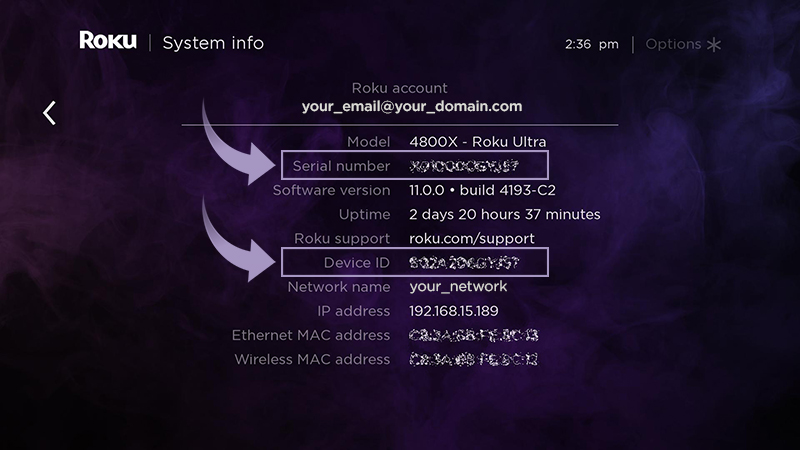
The About screen lists a lot of information about your Roku device. Look for the fields labeled Serial number and Device ID (highlighted below).
On the original packaging
Roku TV
If you have the original box your Roku TV was packaged in, carefully examine all sides for the serial number or device ID. If you have trouble finding it, visit the help pages for the manufacturer or contact them directly.
In the Roku mobile app
Roku TV
If not already installed on your mobile device, download the free Roku mobile app for iOS and Android. To use the Roku mobile app, make sure your mobile device is connected to the same wireless network as your Roku TV. Follow the instructions below to view the serial number and device ID.
- Launch the Roku mobile app
- Select Devices
 on the bottom navigation bar
 - Tap on the device you wish to connect to. Learn what to do if you do not see your device.
- Tap Options ••• next to the connected device
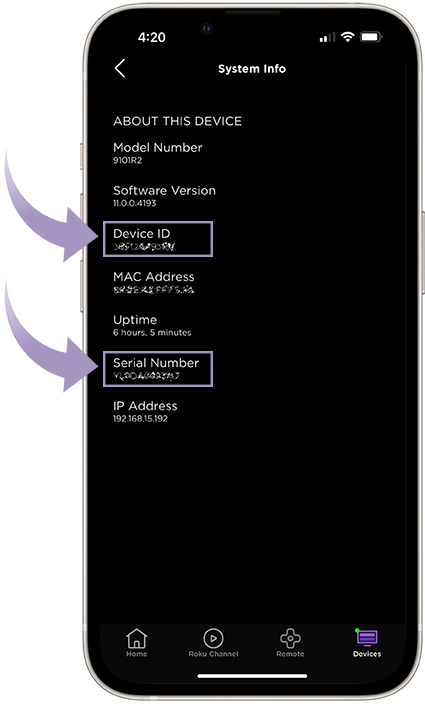
- Tap View System Info to see the Serial Number and Device ID
Last updated at 6/17/2026 9:01:26 PM
Was this article helpful?
Related articles
Need more help?
