Hay dos formas de cancelar la suscripción a los correos electrónicos de marketing de Roku®: a través del mismo correo electrónico o desde tu cuenta Roku. Puedes volver a suscribirte a los correos electrónicos de marketing de Roku si cambias de opinión.

Nota: Seguirás recibiendo correos electrónicos transaccionales importantes de Roku, como información sobre compras, pagos, cambios de contraseña, etc.
Cancelar suscripción a través del correo electrónico de Roku
- Abre un correo electrónico de marketing reciente de Roku.
- Ve al pie de página al final del correo electrónico.
- Selecciona Cancelar suscripción.
- Esto te llevará a una página de confirmación.

Cancelar la suscripción desde tu cuenta Roku
- Inicia sesión en my.roku.com.
- Selecciona Comunicaciones por correo electrónico
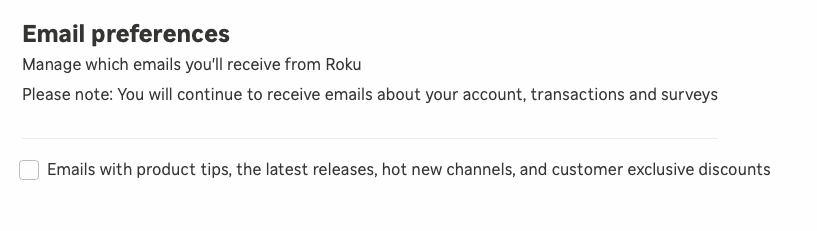
- Desmarca la casilla en Preferencias de correo electrónico para cancelar la suscripción
- Cuando desees volver a suscribirte, solo vuelve a marcar la casilla
Last updated at 9/4/2026 7:49:09 PM
¿Te resultó útil este artículo?
Artículos relacionados
¿Necesitas más ayuda?

Soporte técnico con agentes
Ofrecemos soporte técnico con agentes para ciertos problemas y dispositivos.
Consulta las opciones de soporte técnico