A wired connection can give your Roku® streaming device a more reliable internet signal than Wi-Fi. If your Roku device doesn't have a built-in Ethernet port, you can still go wired by adding a compatible USB Ethernet adapter.
Is my Roku device compatible?
Not all Roku devices support using an Ethernet adapter to connect to your wired network. Refer to the chart below for a list of Roku streaming devices that support an external third-party Ethernet adapter.
| Device | Model |
| Roku Streaming Stick, Streaming Stick Plus | 3840X, 3830X |
| Roku Express | 3960, 3960RS |
| Roku Express 4K | 3940 |
| Roku Express 4K+ | 3941 |
| Roku Streambar® SE | 9104R |
| Roku Streambar | 9102 |
| Roku Streambar Pro | 9101R2 |
| Roku Smart Soundbar | 9101 |
| onn.™ • Roku Smart Soundbar | 9100 |
How do I pick a compatible adapter?
Not every USB Ethernet adapter works with a Roku device. When you shop, look for all three:
- Speed: 10/100 Mbps only. Gigabit (1000 Mbps) adapters won't work.
- Chipset:AX8877X or SMSC95XX chipset. It's usually listed in the product specs.
- Connector that fits your Roku device:
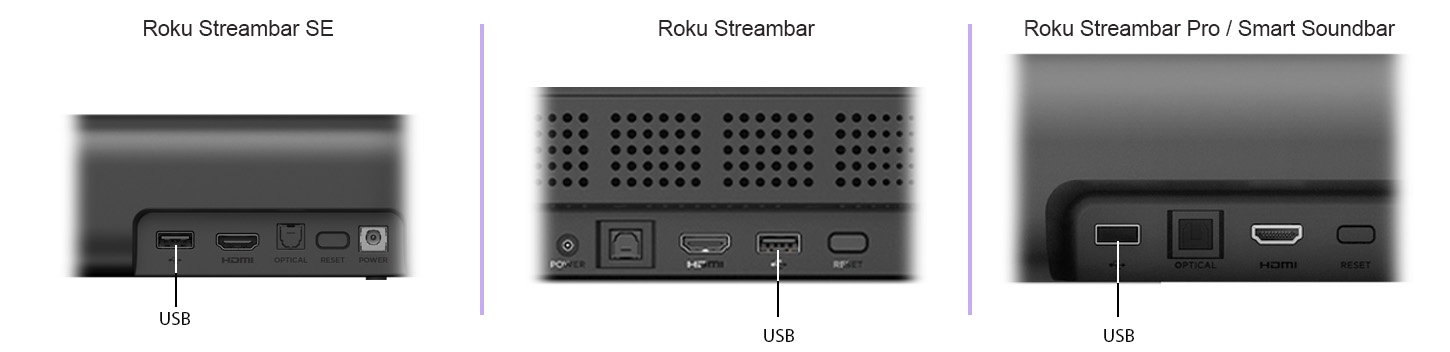
- USB-A — Streambar and soundbar models
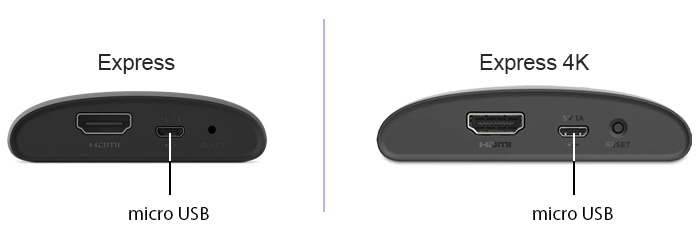
- Micro USB — Express and Express 4K models
- USB-C — Streaming Stick and Streaming Stick Plus
These adapters have been tested with Roku devices.
| Roku Device | Tested Adapters |
| Roku Express, Express 4K, Express 4K+ | UGREEN micro USB to RJ45 Ethernet adapter, Cable Matters micro USB to Ethernet adapter |
| Roku Streambar SE, Streambar, Streambar Pro, Smart Soundbar, onn.™ • Roku Smart Soundbar | Plugable USB 2.0 to Ethernet 10/100 adapter, TRENDnet USB 2.0 to 10/100 Ethernet adapter |
How do I make the wired connection?
For Express models only: unplug the USB power cable from the Roku device first.
Plug the Ethernet adapter into the USB port on the back of the Roku device.
Plug one end of an Ethernet cable into the adapter, and the other end into your router*****.
For Express models only: plug the adapter's power cable into its power adapter, then into a wall outlet. (Streambar and soundbar models power the adapter on their own.)
How do I switch my Roku device to wired?
If you're setting up a brand-new Roku device, follow the on-screen prompts — a Wired option will appear when your adapter is detected. Find setup steps for your specific Roku device.
If your Roku device is already on Wi-Fi, switch it over from the menu:
Press Home
 on your Roku remote
Go to Settings > Network > Set up connection
Select Wired
Select Set up connection
Select Wired
Why is the Wired option not available?
A Roku device only shows the Wired option when it recognizes the adapter. If it's missing:
Confirm your Roku device is on the list above.
Confirm your adapter matches all three specs (speed, chipset, connector).
Unplug the Roku device from the wall, reseat the adapter, then plug the Roku device back in and try again.
Last updated at 9/8/2026 7:43:42 PM
Was this article helpful?
Related articles
Need more help?
